Remove Unwanted Audio Tracks and Subtitles from MKV and MP4

A movie you download often comes with a dozen dubs, a director's commentary and subtitles in languages you never use. Each 5.1 dub takes half a gigabyte or more, and a collection of a few hundred movies easily wastes a whole disk on them. Slim My Movies removes the tracks you don't need and keeps everything else exactly as it was.
Windows 10 and 11, 64-bit. The free version has no time limit.
The file gets smaller without re-encoding the video — that's why it's fast
Video converters make a file smaller by compressing the picture again: that takes the processor from tens of minutes to hours per movie, and every pass loses some quality. Slim My Movies works differently. It never re-encodes video. The space is freed by the tracks you remove, and the video and the tracks you keep are copied into the new file as they are, bit for bit. Saving a movie takes about as long as copying it.
| Slim My Movies | Re-encoding with a video converter | |
|---|---|---|
| Where the space comes from | Removed dubs, commentaries and subtitles | Lower bitrate of the picture |
| Picture quality | Exactly as in the original | Worse with every pass |
| Time per movie | About as long as copying the file | Tens of minutes to hours |
| Processor load | Almost none — the disk sets the pace | 100% for the whole time |
See how it works
Click a picture to enlarge it.
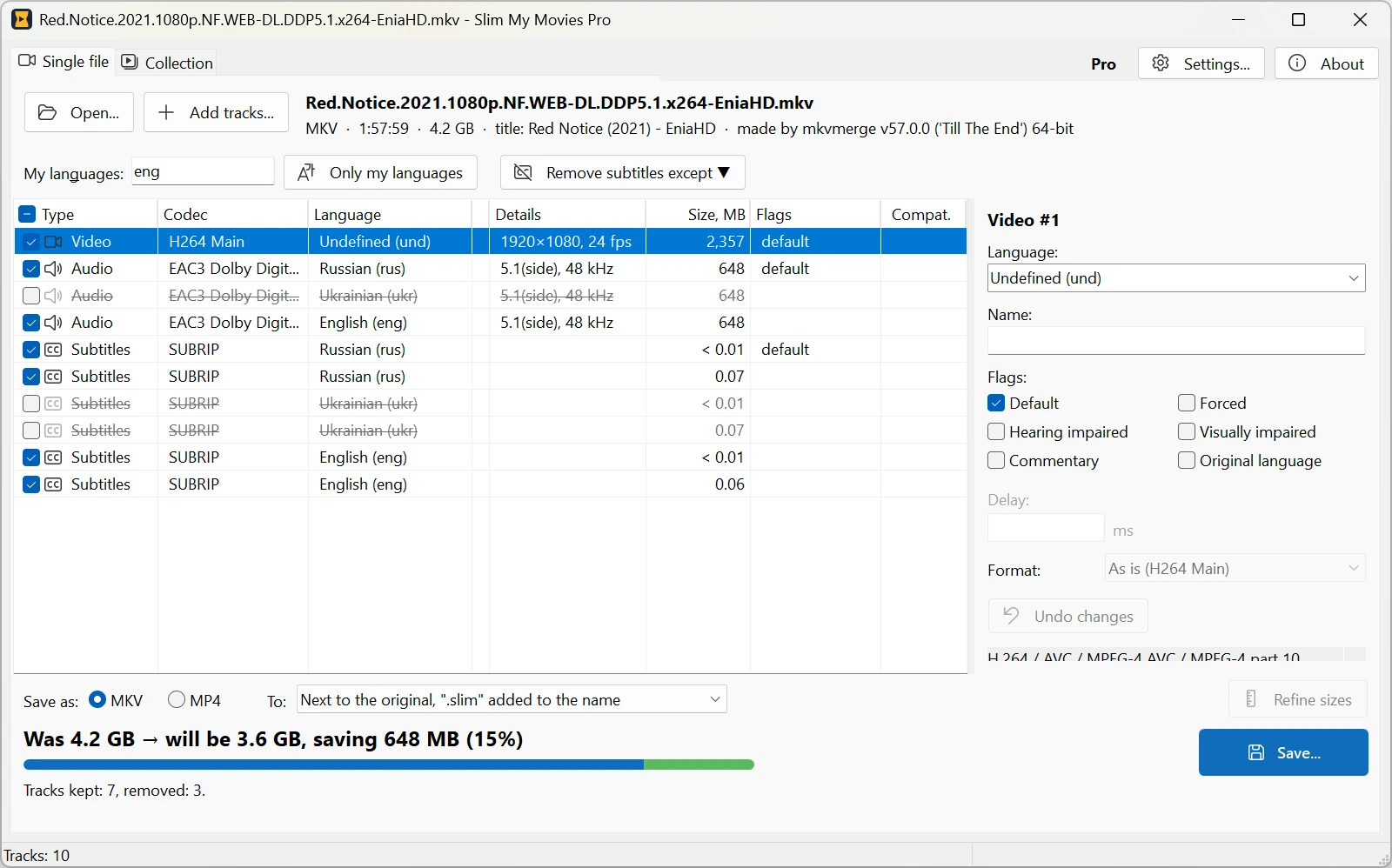
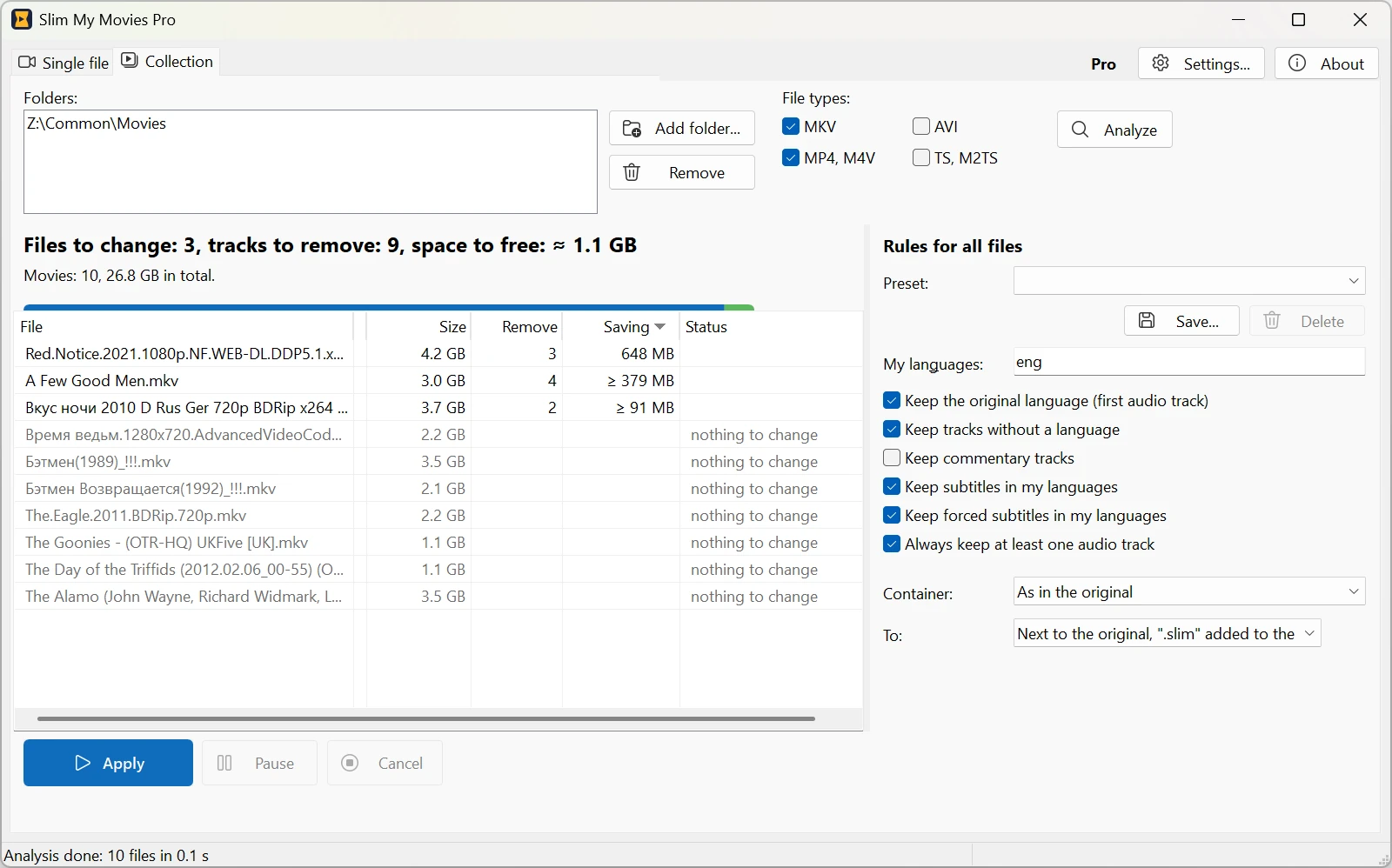
Edit one movie
- See every track: language, codec, channels, flags and size in MB.
- Uncheck the tracks you don't need, or keep only your languages in one click.
- Fix the track language and name, set the default, forced, hearing impaired and commentary flags.
- Add external audio and subtitles (SRT, ASS, SSA, SUP, IDX/SUB) or take tracks from another movie.
- Shift audio or subtitles by a few milliseconds when they are out of sync.
- Save as MKV or MP4 and see the new size before you start.
Clean up the whole collection
- Add one or more folders — the program reads every MKV and MP4 in them and counts how much space you will free, file by file. The analysis is free.
- Set the rules once: your languages, what to do with commentaries, forced subtitles and tracks without a language. The original language of the movie is kept.
- Save the rules as presets — say, one for foreign films and one for anime — and switch between them in one click.
- Apply them to hundreds of movies in one queue, and pause it at any time.
Your originals are safe
By default the result is saved next to the original, with «.slim» added to the name. If you choose to replace the originals, every new file is checked first, and only then the old one goes to the Recycle Bin — nothing is deleted for good. Video is never re-encoded. Only when you save to MP4, a sound track MP4 doesn't support (DTS, for example) can be converted, and the program asks you before it does.
Free version and Pro
| Free | Pro | |
|---|---|---|
| One movie: tracks, languages, flags, delays, external tracks, MKV and MP4 | ✓ | ✓ |
| Collection analysis and the space to free | ✓ | ✓ |
| Applying the rules to the collection | 5 files a day | No limit |
| Rule presets | 1 | Any number |
| Price | Free | $19.95, one-time |
System requirements
Windows 10 or Windows 11, 64-bit. Reads and writes MKV and MP4 (M4V).