Getting a personal Goodreads API key
For a stable connection to Goodreads in All My Books, you need a personal API key. It is effortless to get it, here is the simple how-to.
First of all, you need a personal Goodreads account. If you still don't have it, register here. Do not forget to confirm your e-mail address by clicking on the link in your Inbox.
Now, when you are logged in to your Goodreads account, open this link and fill-in "Application name" and "Company name" fields with some generic values and check "I agree..." box, then click "Apply for a Developer Key" button.
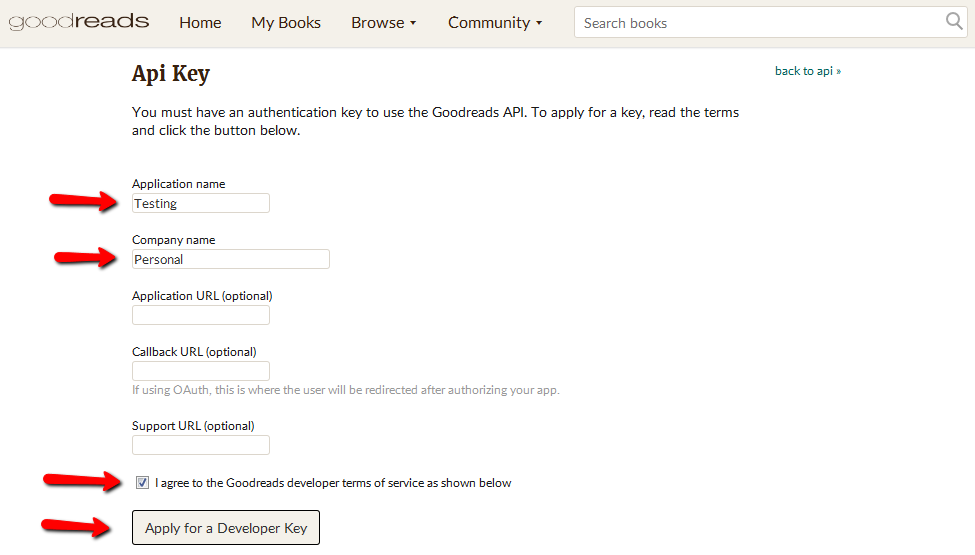
That's all. You don't have to wait for any approval. Copy "key" value (you don't need a Secret key, only the shorter one).
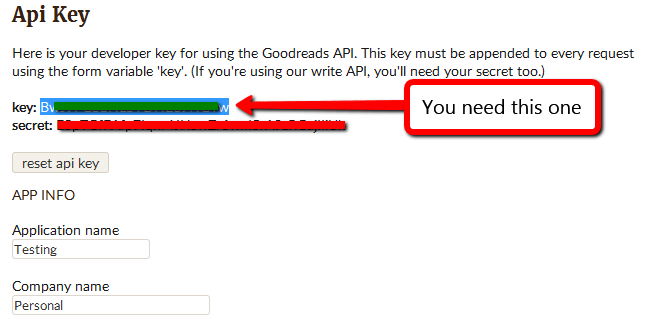
If All My Books asks you for a key, you can paste it to the dialog and press OK key. Alternatively, you can add a key manually by following these steps:
- start Windows Registry Editor (press Win+R keys, type regedit and press Enter key)
- locate the branch named HKEY_CURRENT_USER\Software\AllMyBooks
- create string parameter here (use right-click popup menu) with the name of "GoodreadsAPIKey" without quotes and assign your copied Goodreads key as a value
- close Windows Registry Editor
Now, enjoy All My Books and Goodreads together :)