Best piece of software
"I have collected over three thousand dvd and blu-ray movies in my lifetime. My collection was a mess. I did not know where or even what some of my movies were untill I got All My Movies. The software helped me organize and set my collection back on track. And with the Bar code scan, it was even easier for me to enter these movies into my system. One of the best, if not the best piece of software out on the market for home cataloging home movies."
Michael Buchanan
Barcodes will do it for you!
DVD Barcodes
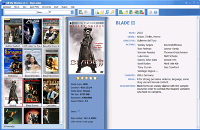
Do you want to get your movie collection organized and don't want to waste your time? This short article will help you make your dream come true :)
The first element you need is software - All My Movies. It is one of the best movie collection organizers on the market and costs only $39.95. Of course, you also need a barcode scanner. The least expensive and fully tested model is CueCat barcode scanner. You can purchase it at Ebay for $7-$15 or even get it for free in some cases.
Your expenses: approximately $50. Not too much for a well organized movie collection with an easy and quick update option.
Movie Barcodes
And making a digital movie catalogue becomes easy as pie!
Start All My Movies, select menu item "Database-New" to create a database for your collection.
Now it is time to add your movies. Use menu item "Movie-Add by barcode" or press the F6 key and use your scanner to read the barcode. That's all! In just a few seconds you will see the full movie details imported into your collection, including the cover image. Quick and easy!
When you lend your favorite movie to your best friend, you still want to keep track of it being lent out. Then you need to quickly locate this particular DVD in your collection of several hundred movies. This is the time for the All My Movies Loan Manager; you can easily mark a DVD lent or returned with this built-in feature. And again, the barcode scanner will help you!
Blu-ray Barcodes are Supported
Use menu "Tools-Locate by barcode" or press ALT-F10 keys and scan the DVD's barcode for fast movie location in your collection. Then press F12 to mark it as lent or returned.
That's all. Have fun with your barcode scanner :)
Our customer say